
Minecraft build guide
Build a Minecraft Villager Trading Hall in 5 Steps
Start with one safe stall, confirm that one villager claims one workstation, and finish a trade before repeating the layout. This test-first method catches linking and access problems while the hall is still small.
The guide covers a compact layout, workstation checks, restocking, and the Java/Bedrock differences that can affect a trading hall.
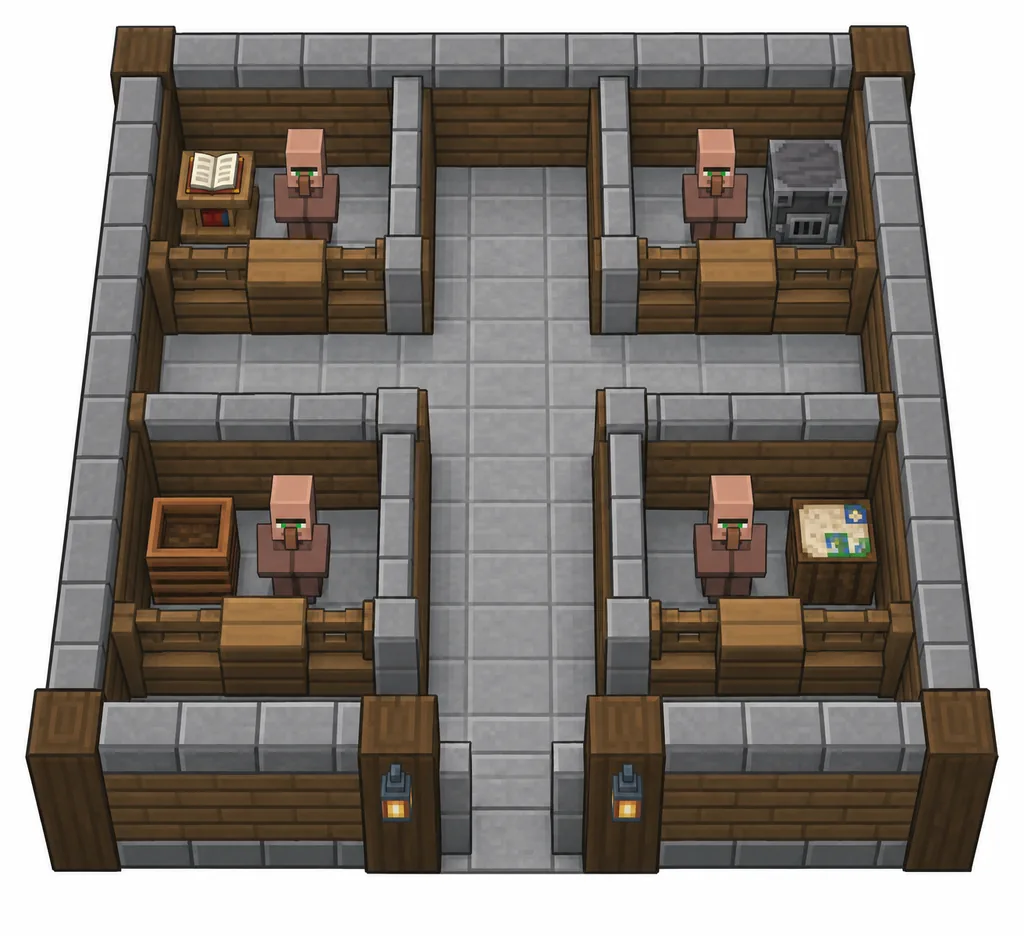
Quick answer
Test one villager before you build a full hall
A reliable villager trading hall is a safe, organized place where each villager can claim and use a workstation. Build one stall first. Bring in one adult villager, place the matching job-site block, check the profession, complete a trade you want to keep, and confirm that the villager can work again. Only then copy the module for more professions.
The exact pathfinding and point-of-interest behavior can differ between Java Edition and Bedrock Edition and can change with updates. Treat the diagram and stall dimensions as planning ideas, not a universal blueprint. Keep access to the villager and workstation visible while testing, and consult current edition notes if a mechanic behaves differently in your world.
One villager, one station
Introduce workstations one at a time so you can see which villager claims each block.
Lock only after testing
A completed trade is a practical way to preserve a profession and offer set before moving other blocks.
Scale after a work cycle
Test access and restocking in your edition before copying the stall across a long row.
Build sequence
How to make a villager trading hall
Build the smallest useful section first. This keeps transport, job-site linking, and trade locking easy to diagnose.
Choose a safe, accessible site
Pick a level area near your base with room to expand and a clear route for boats or minecarts. Light the approach, close gaps where villagers could wander out, and keep hostile mobs away. Leave a service path so you can reach the workstations and inspect each villager without dismantling walls.
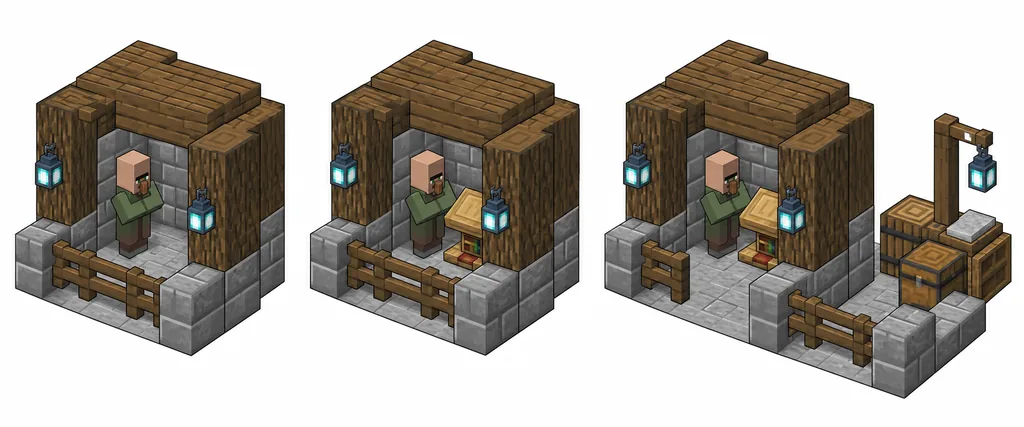
Plan a repeatable stall
Use a simple cell with a protected villager space, a visible workstation position, and an opening that lets you interact. Put a walking aisle in front of the cells. There is no single required block count for every world: prioritize access and testability, then adjust for your edition and transport method.
Bring in one adult villager
Move one villager at a time by boat, minecart, or a safe route. Keep the first test cell separate from other job-site blocks. An unemployed adult can usually take a profession when a suitable workstation is available; a nitwit cannot take a job. Confirm the villager is in the intended stall before placing several stations.
Place and verify the workstation
Place only the block that matches the profession you want. Watch for the profession change and, where available, job-site particles or linking feedback. If another villager claims the block, remove nearby competing workstations and retry before trading. The profession list below maps each job to its workstation.
Complete a trade you want to keep
Inspect the offer before you commit. If the offer is useful, complete a trade to lock the villager's profession and offers. If it is not useful and no trade has been completed, remove the workstation and let the villager unlink before trying again. Once offers are locked, do not assume moving a workstation will reroll them.
Check work access, then copy the cell
Let the villager reach its workstation during the work period and verify that it can restock after using its offers. If it cannot, solve the access or linking issue in this single cell. When one stall works through a normal day in your edition, duplicate the layout and assign the next villager separately.
Edition and update check
Keep build rules separate from trade lists
The official Minecraft Java Edition 26.3 release note, published September 15, 2026, mentions new villager trades unlocked as villagers level up. That is a reminder to check current in-game offers rather than copy an old price table. This guide focuses on the hall layout and workstation workflow; it does not promise a fixed trade price or list every offer.
Villagers use job-site blocks to take professions and perform work. The Minecraft Wiki's villager, trading, and job-site references explain the underlying mechanics in more detail. They are community-maintained references, so compare them with the version you are actually playing when a recent update may have changed behavior.
Java and Bedrock can link villagers to nearby job sites differently. In Bedrock, nearby villagers and village points of interest can make an apparently open workstation belong to someone else. Isolate one villager, watch which station is claimed, and avoid moving several workstations at once. A small controlled test is more dependable than assuming a design from another edition will work unchanged.
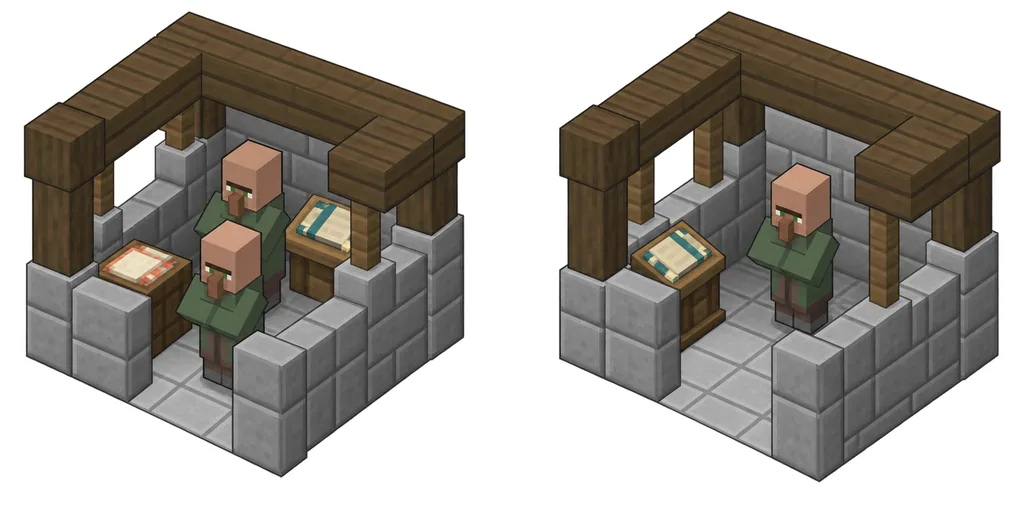
Workstation reference
Match the profession to its job-site block
Use this list to find a station, then test it with one villager before placing duplicates. A workstation can be claimed by a different nearby villager if several are eligible.
Troubleshooting
Diagnose a broken stall before rebuilding the hall
If a villager does not take the intended job, first check whether it is an adult and not a nitwit, whether it already has a profession, and whether another eligible villager can reach the station. Remove competing job sites from the test area, wait for the villager to update, and place one workstation again. A completed trade locks a profession, so do not expect a traded villager to become an unassigned novice after breaking its block.
If a villager stops restocking, verify that the correct villager is linked to the expected workstation and can use it. Check for walls or blocks that prevent interaction, confirm the workstation has not been claimed elsewhere, and observe a work period in the actual game. Bedrock village linking and Java job-site behavior are not interchangeable; test a single stall with the rules for your edition.
Prices can rise after repeated demand or change through game mechanics such as gossip and curing. A higher price does not automatically mean the hall is broken. Avoid applying an old discount trick to every villager: verify the current version and the trade you care about, then change one variable at a time.
Common failure points
Avoid these trading-hall setup mistakes
Most problems are easier to solve before multiple villagers and stations are packed into the same room.
Placing every workstation at once
Several eligible villagers can claim stations in an order you did not intend. Add one job-site block, verify the link, then continue.
Blocking the workstation
A villager may appear assigned but still be unable to use its station. Keep the block and its approach observable while testing.
Trading before checking the offer
A completed trade locks in a villager's profession and offers. Inspect first, then trade only when you want to preserve the result.
Copying a design across editions
A Java layout may behave differently in Bedrock because linking and village rules differ. Test one module in the world and version you play.
Treating every price change as a bug
Demand and other game mechanics can change offers. Confirm the villager can restock before changing the room layout.
Related guides
Plan the rest of your Minecraft setup
These pages cover adjacent decisions without replacing the trading-hall steps above.
Java vs Bedrock
Compare edition behavior, devices, multiplayer, and compatibility before choosing which build rules to follow.
Compare editionsMinecraft Seeds Guide
Choose and test a world with space near a village before committing your main survival base.
Explore seed checksReferences
Sources and version context
The guide uses current first-party release notes for version context and community-maintained mechanics references for detailed behavior.
Minecraft Java Edition 26.3
Official release notes published September 15, 2026; includes a note about new villager trades unlocked by leveling.
Read official release notesVillager and trading mechanics
Community-maintained references for villager professions, trading, and job-site behavior. Check the page history and your game version when mechanics may have changed.
Review villager mechanicsVillager trading-hall tutorial
A community build reference for hall concepts; use it as a starting point, then test workstation links in your own edition and version.
Read the community tutorialQuestions
Villager trading hall FAQ
How do I make a villager trading hall in Minecraft?
Build one protected stall, move in one adult villager, place its matching workstation, verify the profession, inspect an offer, and complete a trade only if you want to lock it. Confirm the villager can use the station and restock before repeating the cell.
How many villagers do I need for a trading hall?
There is no required minimum beyond the villagers you want to trade with. Start with one, test its workstation link and restock cycle, then add only the professions or offers you use.
Does every villager need a workstation?
A villager needs its profession's job-site block to take or perform that job. A trading hall is easiest to diagnose when each working villager has one clearly identified workstation and can reach it.
Why is my villager not restocking trades?
Check whether the right villager is linked to the correct workstation, whether it can physically use the block, and whether it has had a chance to work. Test one stall and apply the rules for your edition; Java and Bedrock linking are not identical.
Can I reroll a villager's trades after I trade with it?
Do not expect to reroll a villager after completing a trade. A completed trade locks its profession and offers. Check the offers before the first trade if you want to keep the option to reset an untraded villager.
Is a Java trading hall design the same in Bedrock?
Not always. Villager job-site and village point-of-interest linking differ between editions and can change between releases. Test a single workstation with the version you play before building a large hall.
Why did villager trade prices go up?
Demand and other game mechanics can change prices. First check that the villager is still linked and can restock; then verify any discount method against current version notes instead of assuming the hall layout caused the price change.
Is this a villager trading hall schematic download?
No. The page provides an editorial layout diagram and build checks, not a downloadable world, schematic, or Minecraft save. Follow the diagram as a planning aid and verify every block in your own world.